DAM Automation
From 6 Hours to 15 Minutes
Python Workflow Automation for Label Generation
Key Results
96% time reduction
Constant processing time
Zero-error standardized output
Role & Timeline
Python Developer & Automation Specialist
Fall 2025 (14 weeks)
Approach
CSV validation (pandas)
In-memory compression (Pillow)
Automated layout (ReportLab)
Open-source release
The Challenge
Our archivists manually created labels in Microsoft Word, entered metadata, inserted images, and copied layouts, repeating these steps for 30+ items. Each page of 4 labels required 45 minutes of repetitive work. A typical 30-item batch (8 pages) took over 6 hours. However, this manual process wasn't designed for scale. One of the key challenges we faced was automating the label generation workflow and reducing operational friction.
Manual workflow: .csv → .docx → .pdf → finished garment bag
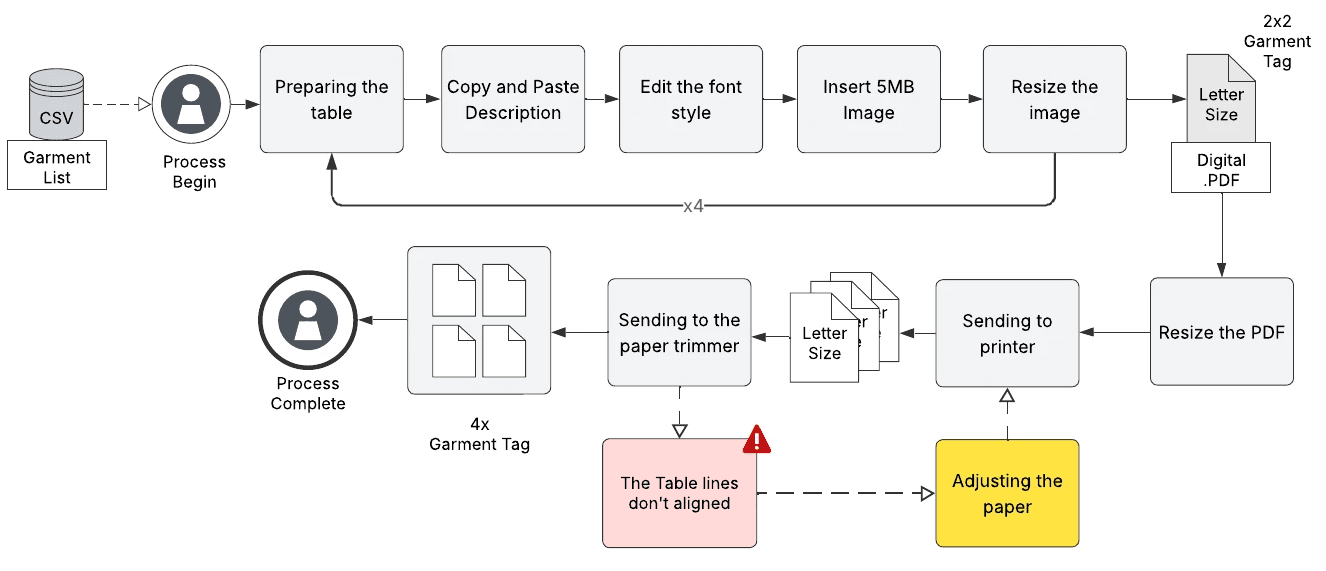
The workflow pipeline for developing garment bags manually took around 45 minutes to prepare a single letter-sized page, ensuring consistent size and placement for each garment bag.
As a Python Developer and Automation Specialist, I built an automated pipeline that processes CSV exports and images directly from the dataset, converting them into print‑ready PDFs. Our design decisions were guided by the Role-based workflow and institutional constraints, non-technical end users, limited budget, and existing data infrastructure. This workflow reduced label creation time, compressed files, and eliminated manual layout errors.
Discovery
Design Decision 1#
Automation Pipeline Architecture for Scale
Manual Word forces linear time; each item adds 6 minutes. Python delivers constant time: 30 or 300 items, both take ~15 minutes max. The bottleneck wasn't the labels themselves. It was the repetitive human actions that created them.
PROCESSING TIME BY BATCH SIZE
The final result (.qty) | Manual Work | Python Automation |
|---|---|---|
1 page (4 items) | 45 mins. | 15 mins. |
4 pages (16 items) | 180 mins. / ~3 hrs. | 15 mins. |
8 pages (30 items) | 360 mins. / ~6 hrs. | 15 mins. |
As the batch size grows, the gap widens exponentially. With the new automation pipeline comes the scalability advantage: Manual Word requires 45 minutes per page: 1 page takes 45 minutes, 8 pages take 6 hours. Python automation processes all pages in a single 5-minute run. As collections grow, manual time scales proportionally, while automation time remains constant.
Pleas refer to the image on the right to see what happened behind the code.
Automated 3 functions
Validation & Error-handling
checks the schema and flags missing images, prevents errors for non-technical users.
Reliable Compression
Reduces 5MB images to 200KB in-memory, w/o adding new files.
Auto Layout and Style
Generates a 2×2 grid, auto-paginates with one command, any batch size. Reportlab.
Automatic workflow: .csv → .pdf → finished garment bag

The automated garment bag development workflow took less than 15 minutes to prepare both single letter-sized pages and up to 50 pages with zero errors.
Design Decision 2#
Image Optimizing for Purpose
Each physical label is printed at 2x2 on Letter-size paper at around 150 DPI. Labels don’t require publication-quality images, as they would increase the PDF file size. Staff only need to quickly and accurately recognize garments on the shelf.
That allowed us to optimize around recognition rather than maximum fidelity:
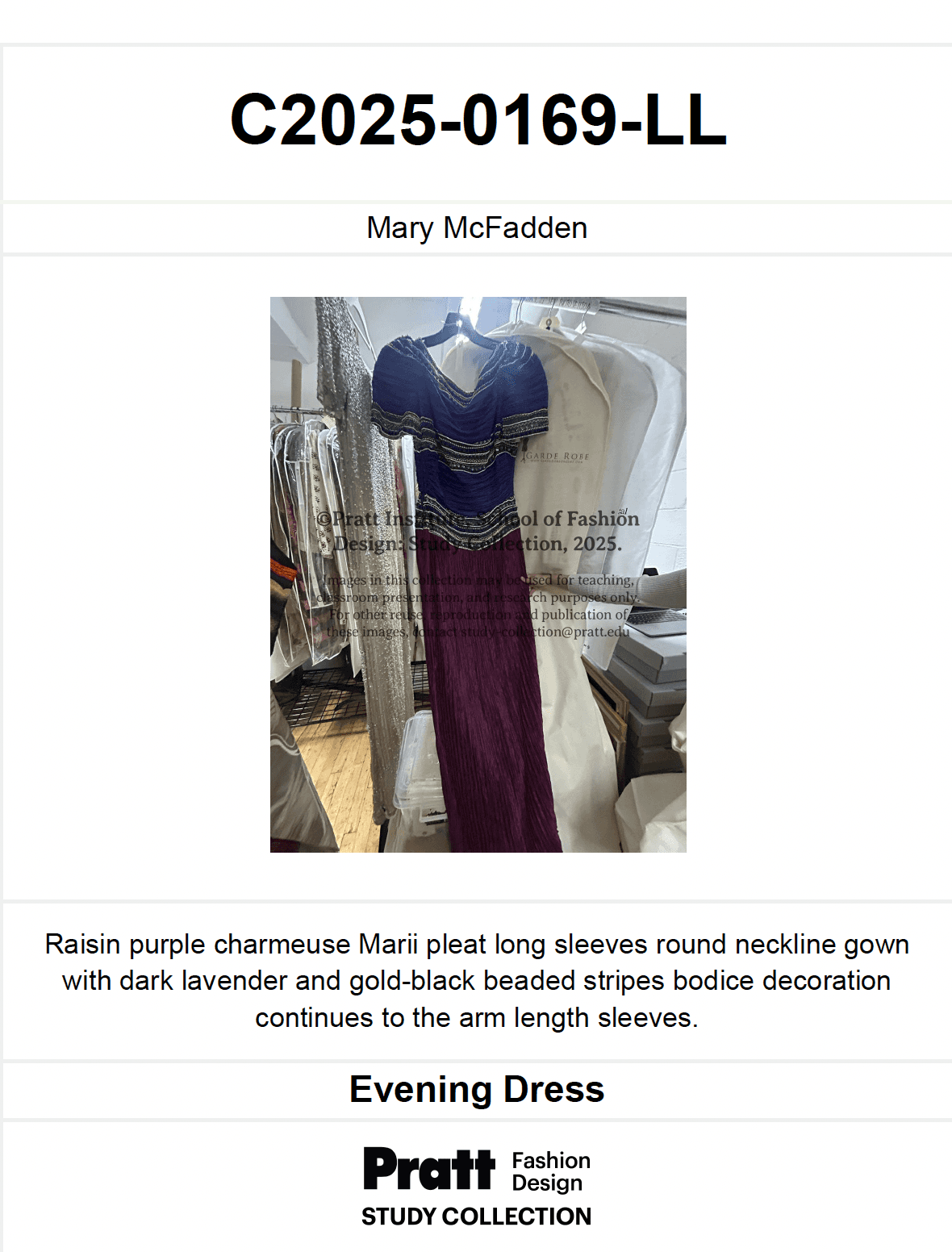
Original Image
5MB, 3000×4000px image size. Total 6 pages with 30.5 MB file size.
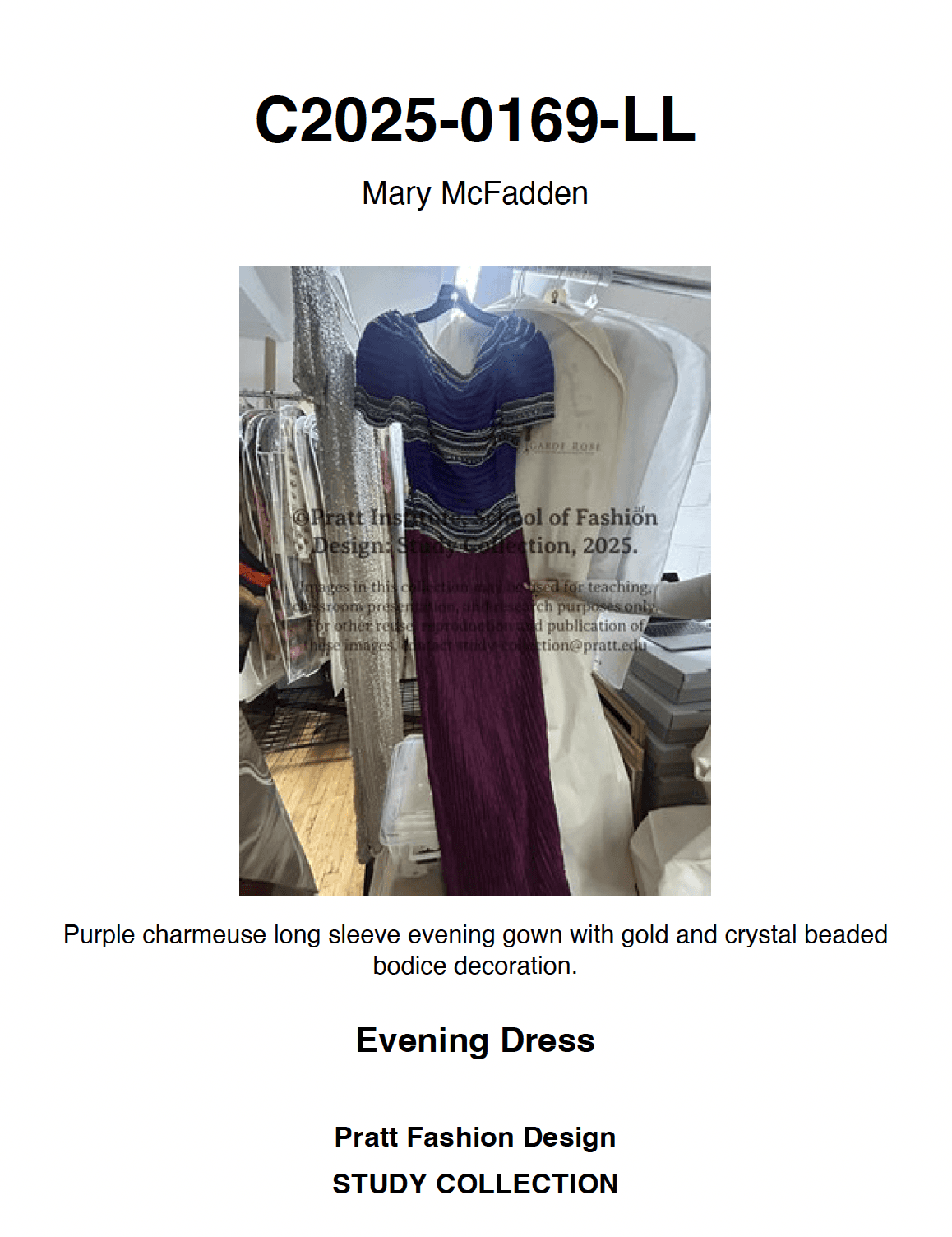
Compressed Image
~200KB, 400×533px images size. Total 8 pages with 1.1 MB file size.

For archivists, this matters because they rely on fast visual scanning, similar to how librarians scan book spines.
High‑res originals stay protected, while labels become lightweight, functional tools for daily work. This principle generalizes well: optimize output for its specific task. Example: labels, thumbnails, preview images, and proof sheets, rather than requiring all outputs to include high-quality photos that meet long‑term preservation standards.
Design Decision 3#
File Naming Management
Archives run label batches weekly, sometimes multiple times per day. Automated systems need to prevent file overwrites and enable easy navigation. A smart naming convention eliminates the chaos of "final_v2_REAL_final.pdf".
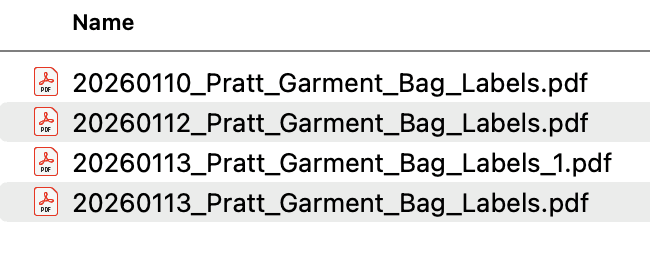
Using the YYYYMMDD format enables chronological sorting so that December labels always appear after November without any manual organization.
Adding an institution prefix supports multi-institution adoption, allowing costume museums and theater archives to use identical codes without filename conflicts.
An auto-increment counter prevents accidental overwrites and allows staff to rerun processes or apply corrections without losing previous versions.
This pattern generalizes well: any automated output system (such as reports, exports, or backups) benefits from a timestamp + entity + counter file-naming architecture.
Business Impact
Making label creation scalable. Works for inventory, fashion archives, costume museums, theater collections; anywhere garments need visual identification in protective storage.
PROCESSING TIME
96% time reduction
6 hours reduced to 15 minutes per batch (370 minutes saved). Reallocated to research support and patron services.
COMPRESSION QUALITY
96% compression achieved
Light file migration. Printers don't crash. 6MB files flow smoothly vs 150MB failures.
PRODUCTIVITY
13 min saved per request
Visual shelf scanning replaces opening multiple bags. Immediate researcher access.
VERSION CONTROL
0 file overwrites
Timestamping and institution naming prevent data loss across 24 annual batches.
Next Steps
Planned enhancements: QR code integration linking tags to online collection records, configurable grid layouts (1×1, 3×3, custom sizes), and Airtable-based interface for archivists to manage print queues—similar to the TMS integration approach in the database project. Monitoring adoption across fashion archives and theater costume collections with 3-, 6-, and 12-month check-ins.
Reflection & Learning
Designing this pipeline forced me to think beyond “write a Python script” and focus on role-based access. The constraint was preparing a clean CSV that matches the archive’s resource fields, so I documented the schema and process so staff can export from Airtable/Excel and run the pipeline without touching code.
This project reinforced how automation can eliminate mundane, repetitive tasks, allowing experts to focus on higher-value work. By automating label generation, archivists spend less time copy‑pasting and fixing layouts, and more time improving researcher experience; supporting discovery, access, and interpretation of the collection.
Learn More
Open-source Python automation turning 6-hour manual workflow into 15-minute command. Built for non-technical archivists, reusable across cultural institutions. Complete tutorial, sample data, and production code available in the Github link accesible through the button below.
Table of Contents