Workflow Optimization
From 30% Errors to Zero
Relational Database for Collection Integrity
Key Results
Eliminated 30% error rate → 0%
60x query speed improvement
Scalable system for 5,000+ records
Role & Timeline
Database Design
Fall 2024 (14 weeks)
Approach
Systematic normalization (3NF)
Stakeholder workflow mapping
MySQL triggers & views
ERD modeling
The Challenge
I was part of a core team responsible for managing the Pratt Study Collection archive, which comprises more than 400 garments and textile items. Our university's textile archives have been using Google Sheets with XLOOKUP and TRANSPOSE formulas; however, these formulas were designed for a single query. One of the key challenges we faced was automating the daily operations workflow and reducing friction for our stakeholders.
I developed a normalized database (3NF) to reduce data redundancy, improve data quality, and enhance data integrity. Our design decisions were guided by the stakeholder workflow and task mapping, both of which were agent-driven and query-based.
Discovery
Design Decision 1#
Modeling Data from the Daily Operation Workflow
Understanding how tables relate as entities
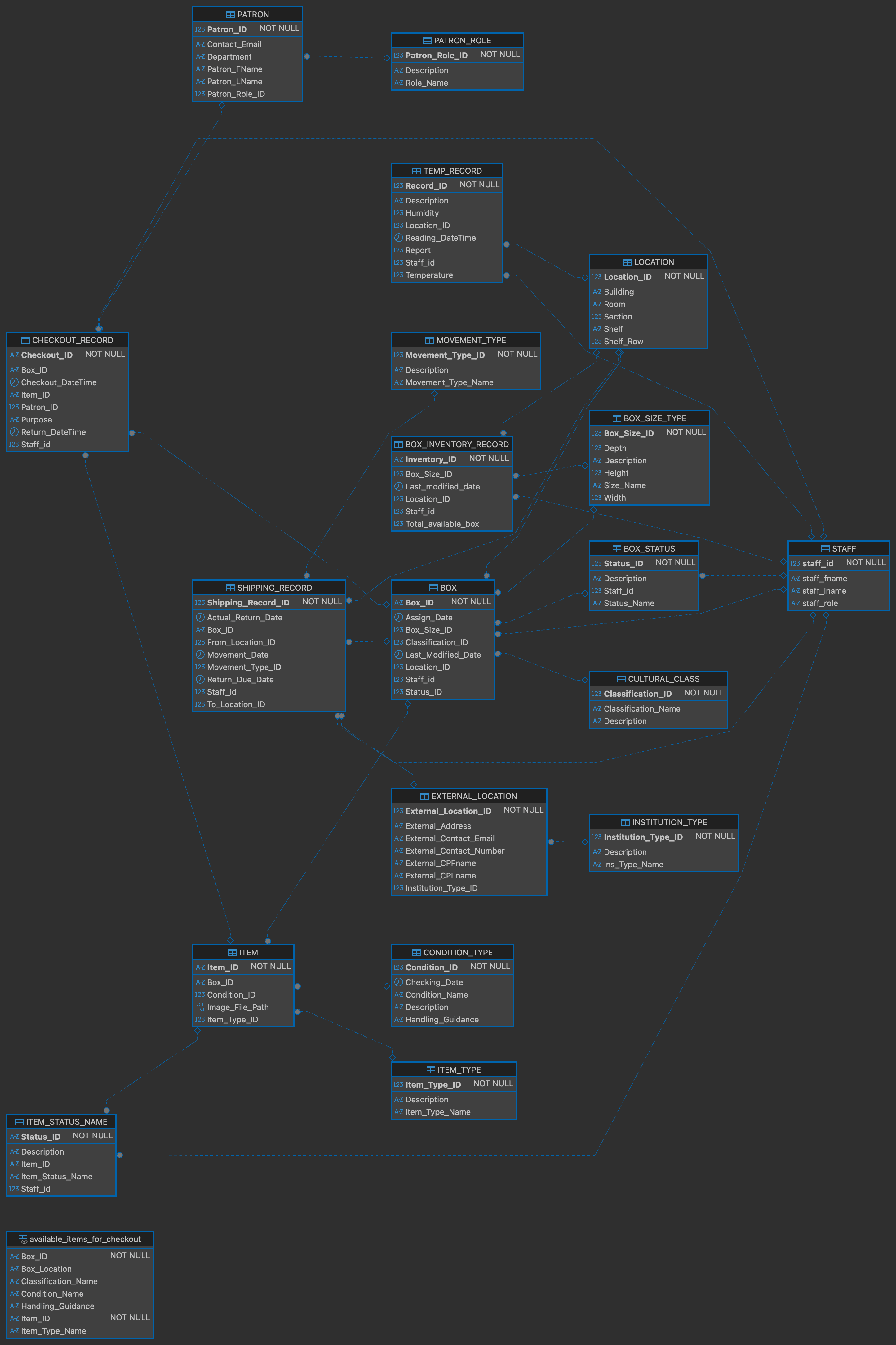
Spreadsheets contained circular references unrelated to other tabs, requiring users to open multiple tabs to perform a single task. These are based on stakeholder interviews with the librarian, conservator, and archivist, who also served as registrar, providing insight into their operational tasks and yielding 19 entities for version 1.
Please explore different users' interactions below;
As the batch size grows, the gap widens exponentially. With the new automation pipeline comes the scalability advantage: Manual Word requires 45 minutes per page: 1 page takes 45 minutes, 8 pages take 6 hours. Python automation processes all pages in a single 5-minute run. As collections grow, manual time scales proportionally, while automation time remains constant.
Pleas refer to the image on the right to see what happened behind the code.
This is the scenario mapping before it became this Entity-Relationship Database.
Explore Other Users!
Archivist
Librarian
Conservator
Admin
Archivist
Primary Responsibilities
Collection management, item processing, and box organization
Database Interactions
Catalog items, assign boxes, update locations, monitor conditions
Scroll the Map
This is the scenario mapping before it became this Entity-Relationship Database.
Defining parent—child table relationships
The staff will not update the status of an empty box. Instead, items will be assigned to a new box rather than the designated one. To support this daily workflow, we use a three-tier architecture for the database. Below is a snippet showing a Staff Entity connected to another entity. Click the image to enlarge, and click outside to exit preview mode.
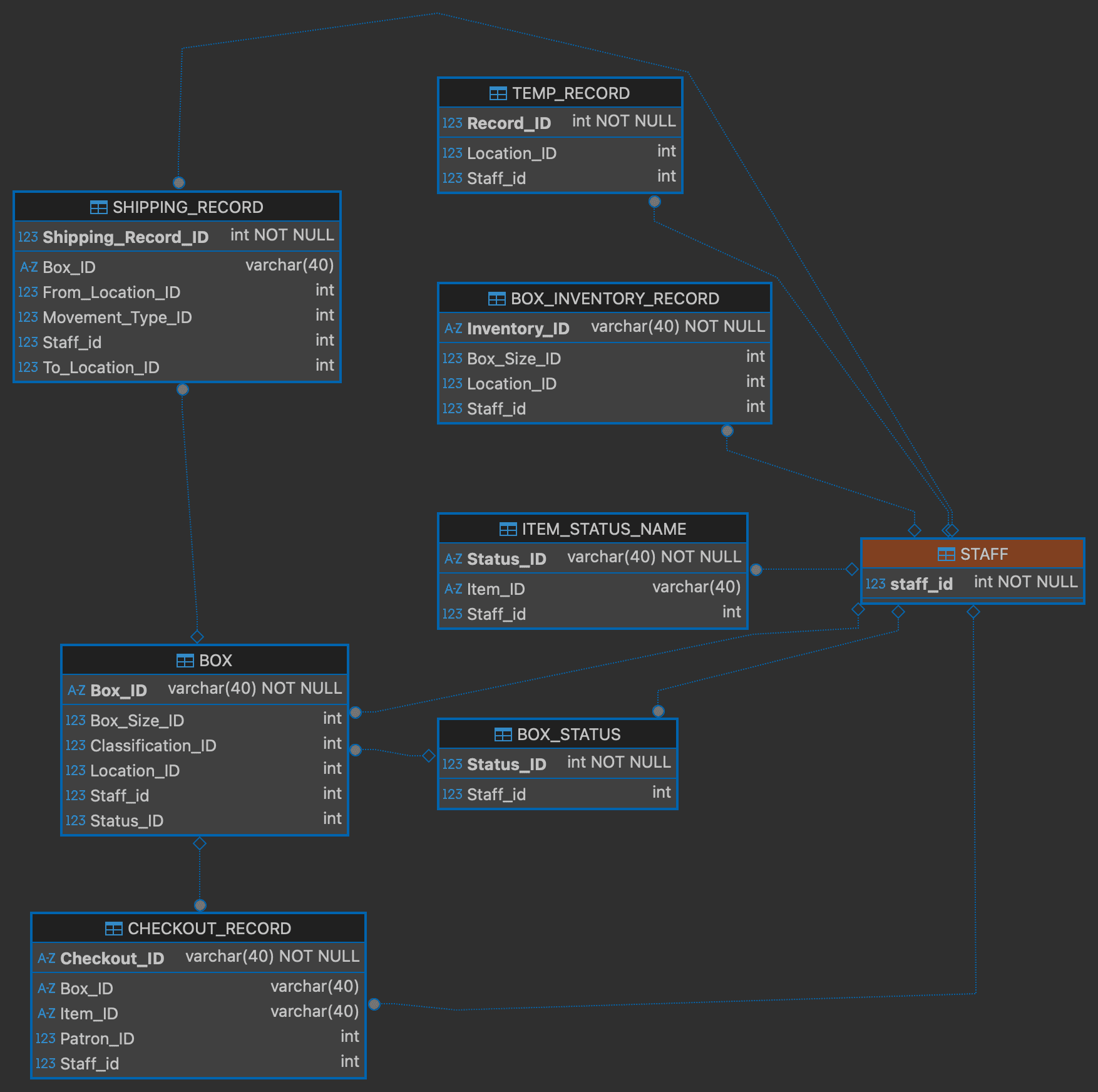
Foundation Tier
In this case is the Staff. No dependencies.
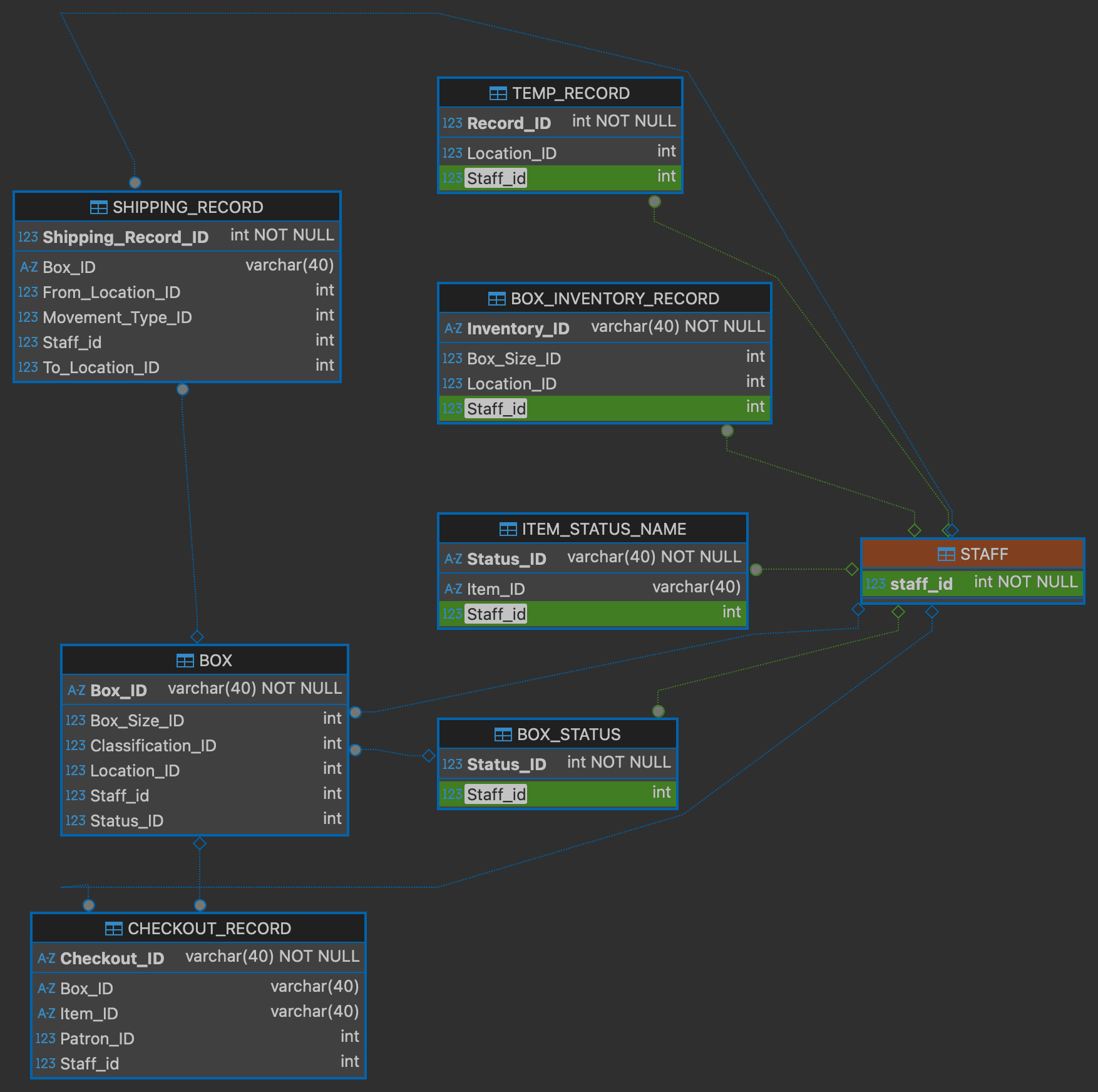
Depedent Tier
The second from the left column; staff must be assigned to it.
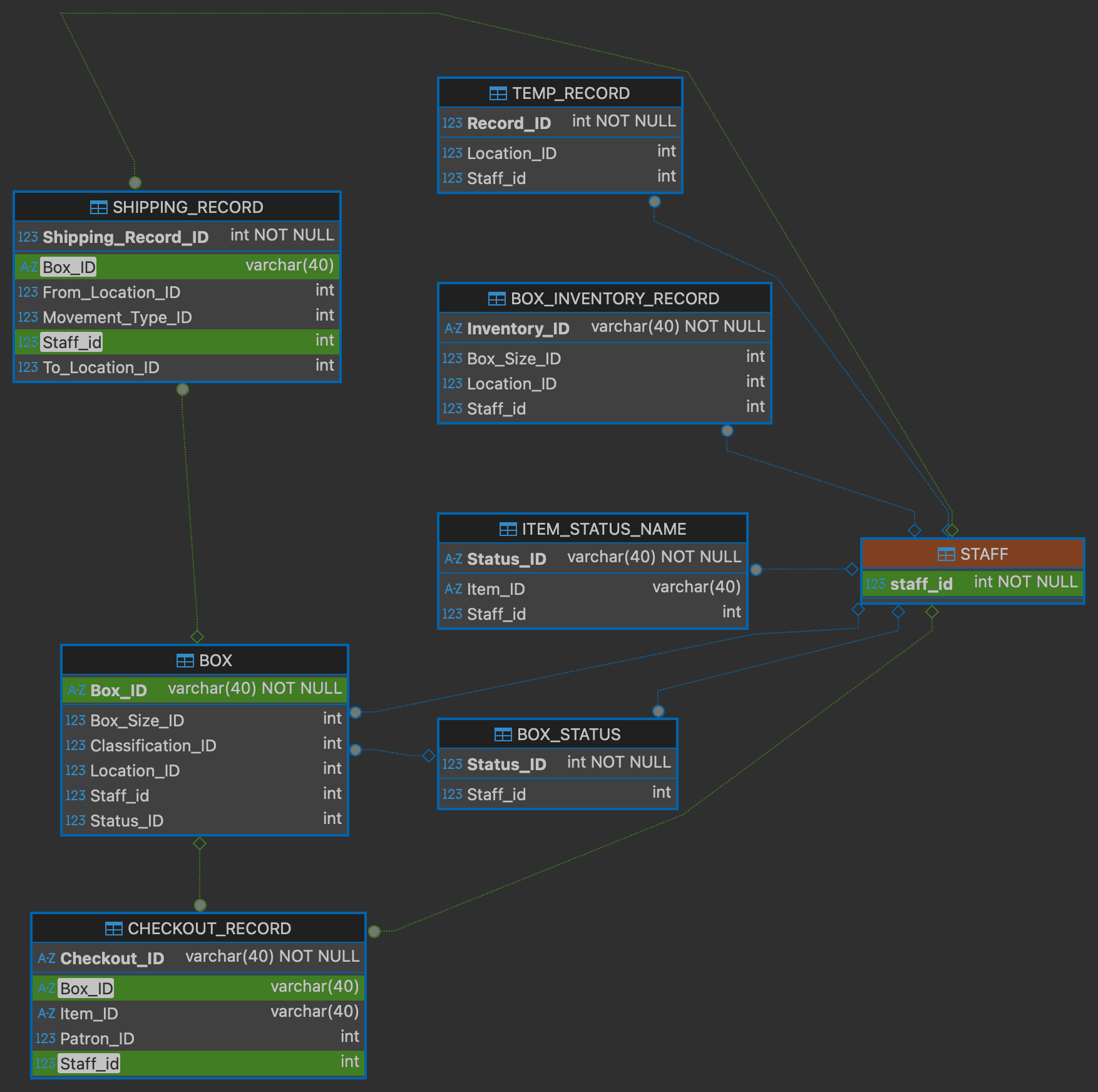
Operational Tier
There are more than two entites need to exist on the first place.
Explore more by scrolling through the whole ERD map below. This is a map from the SQL tool DBeaver.
Design Decision 2#
Automating Manual Check-in/out with Trigger
One of the primary processes in the archive is patron check-in and check-out of items in the reading room, and the librarian is responsible for updating the status in real time. The responsible table or entities, including item status, box status, box location to climate storage, and return timestamp. Database triggers enforce workflows automatically. One action (recording return time) cascades through other tables.
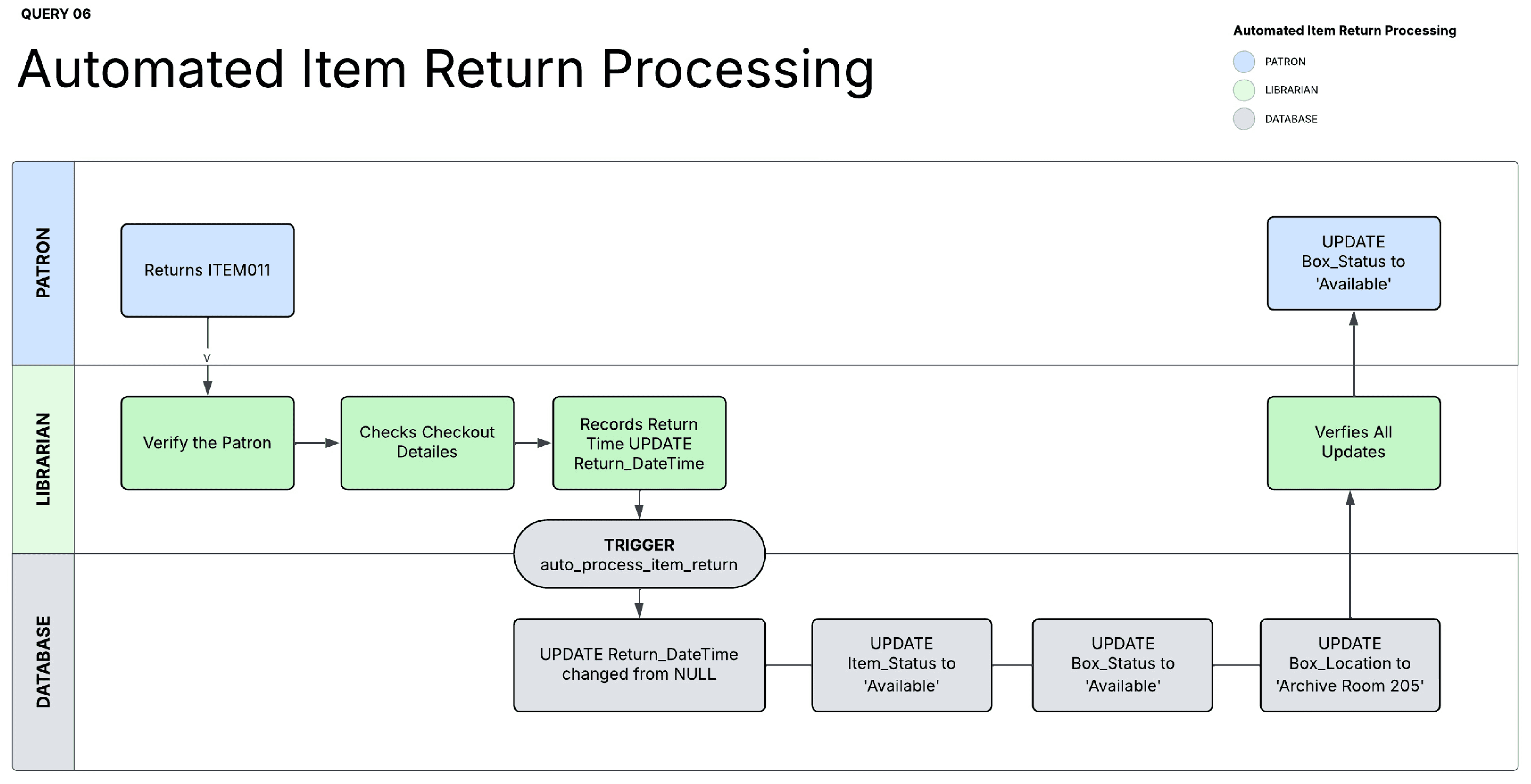
Workflow mapping of the View Automation
Design Decision 3#
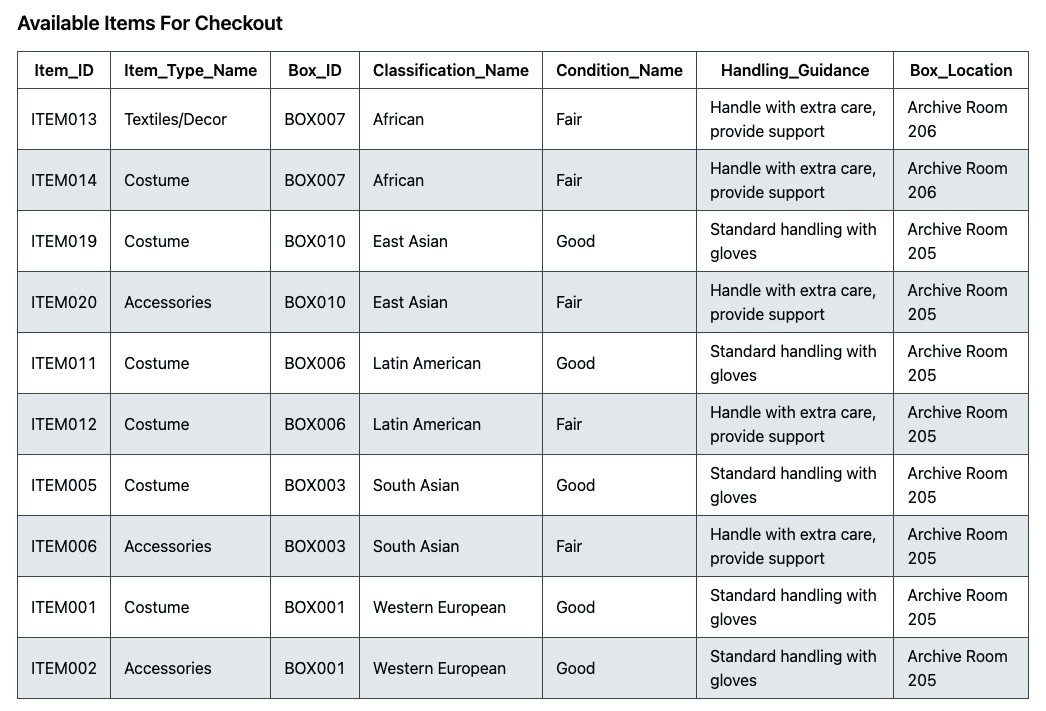
Real-time available checkout item views
Patrons frequently ask which items are currently available for checkout, so librarians need a fast way to see safe, ready-to-loan items in real time. Previously, this took about 15 minutes per request, as they filtered for Available status, cross-checked conservation restrictions, confirmed storage locations, and verified active checkouts, repeating the process throughout the day. Using this query, we JOIN 7 tables and three levels of nested subqueries that execute in under one second.

The librarians rely on this query frequently, allowing them to spend more time assisting patrons in researching costume history and asking the right questions rather than searching for data.
Business Impact
Making archive operations reliable. Scales to museum collections, research specimens, equipment tracking—anywhere physical items need location and rule enforcement.
DATA QUALITY
Eliminated 30% error rate
Foreign keys prevent impossible states. Items can't be marked Available while checked out.
QUERY SPEED
60x faster (15 min → 15 sec)
Automated view with 7-table JOIN replaced manual filtering. Single query instead of repeating a 15-minute process 10+ times daily.
PRODUCTIVITY
2.5 hours/day recovered
Automated triggers eliminate repetitive tasks. Time previously spent verifying status now spent helping patrons research costume history.
PRESERVATION
100% compliance achieved
Status cascades automatically enforce restrictions. Zero violations since deployment.
Next Steps
Next, I plan to expand queries to cover additional daily archive tasks (including automatic environmental alerts), build an Airtable-based app interface aligned with the existing TMS, schedule 3-, 6-, and 12-month check-ins to ensure the database remains aligned.
Reflection & Learning
Through conversations with daily users, I defined a small set of high‑impact queries that reduced friction and delivered measurable improvements within the semester. Translated staff pain points into database behaviors and query patterns that can support inventory systems where physical objects, locations, and preservation rules must stay synchronized. While this phase centered on physical box logistics, the design can scale to broader inventory.
Learn More
Open-source Python automation turning 6-hour manual workflow into 15-minute command. Built for non-technical archivists, reusable across cultural institutions. Complete tutorial, sample data, and production code available in the Github link accesible through the button below.
Continue Exploration
Table of Contents